Free Study Apps Every Student Needs
Table of Contents
While downloading five or more apps for studying is a common practice for most learners, they usually use just one of them. The problem is not a poor selection of study app alternatives; rather, the issue lies in choosing applications that really meet your learning needs, help you remember things, and manage your workload.
This guide ranks the top 14 free study apps that are really helpful for studying in 2026 in terms of five main categories of apps – flashcards, memory training, notes, focus and planning, as well as learning with the use of artificial intelligence. All of the apps mentioned below offer either a truly valuable or at least a sufficient free version of the product.
Instead of ranking the apps according to their popularity, this ranking contains evidence-based approaches to learning, including active recall, spaced repetition, focus management, and other factors. It will be helpful to both high school and college students.
KEY TAKEAWAYS
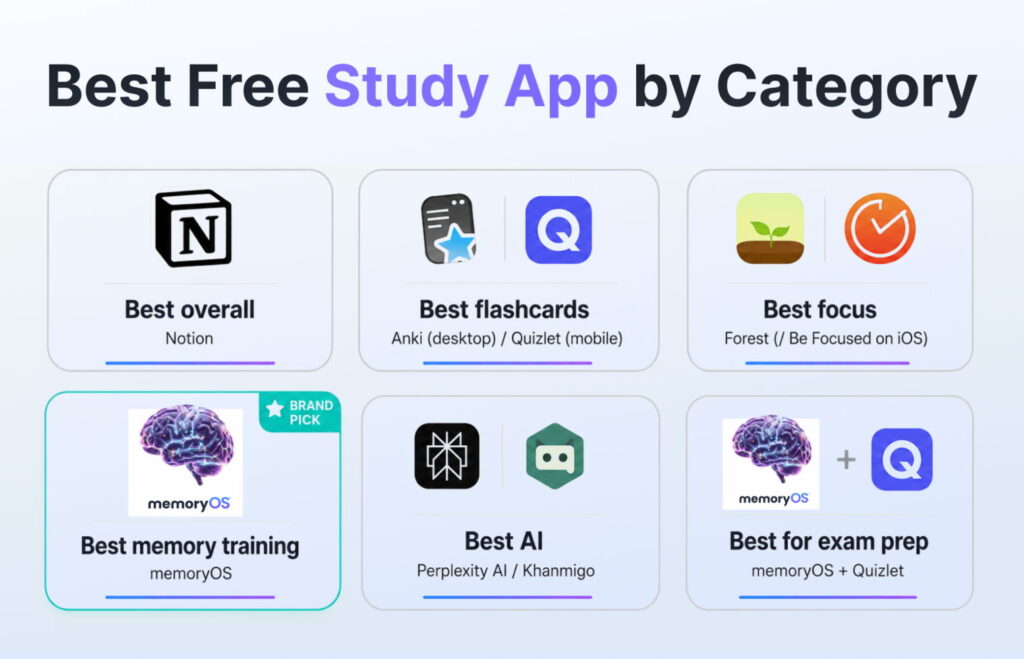
Best free study app overall: Notion (note-taking + planning, generous free tier)
Best free flashcard app: Anki (desktop) / Quizlet free tier (mobile)
Best free focus app: Forest (free version) / Be Focused (iOS)
Best free memory training app: memoryOS (Memory Palace + gamification)
Best free AI study app: Perplexity AI / Khanmigo (Khan Academy)
Best for exam preparation: memoryOS + Quizlet combination
Key insight: The most effective study systems combine retrieval practice, spaced repetition, and focus management rather than relying on a single method.
How We Chose These Free Study Apps
Not every tool deserves to make it onto this ranking. To select the best study apps for students, we used five criteria that should help ensure the usefulness of apps for actual studying.
First, there was the matter of the free version offering something useful. Tools, where all the useful functions could only be accessed during a three-day trial period, did not pass the selection process. Secondly, we required the application to work on either iOS or Android. Thirdly, the tools had to offer at least one scientifically proven technique such as active recall, spaced repetition, Pomodoro, or note-taking.
Finally, the privacy policy of the app is considered. It is important to use tools that explain how the student data is processed.
This approach is supported by numerous studies. Thus, Karpicke & Blunt (2011) found that retrieval practice leads to about 50% higher retention rates than re-reading of material. That is why this rating pays attention to the effectiveness of learning.
Best Free Flashcard & Memory Apps
Flashcards still represent one of the most effective learning tools that can be used in conjunction with active recall and spaced repetition. To learn more about a detailed comparison between different flashcard applications, refer to our article about the best flashcard apps for students.
Below is the list of the three best free flashcard apps and broader free study apps.
Anki — Best for Self-Directed Spaced Repetition
Anki is still considered to be the best application for students who have to deal with learning systems. While the application is completely free in terms of using its web version, for iOS, it should be purchased for only $24.99. Anki uses a very well-developed spaced repetition system, which is based on many years of memory science discoveries. This app is perfect for students who are able to create their own decks. You can use a free desktop download to start learning.
Quizlet — Best Free Flashcard App for Getting Started Fast
Quizlet is one of the most popular studying apps around the globe, offering millions of study materials that can be accessed for almost all kinds of subjects. Flashcards, learn mode, and matching game options come along with the free version, allowing users to begin their studies without any delay. Quizlet is a perfect choice for those learners who like to use pre-made sets rather than creating new ones.
memoryOS — Best Free Memory Training App
Unlike conventional flashcards that follow the same system, the memoryOS employs a memory palace, which was created alongside Jonas von Essen, a 5× World Memory Champion. The system incorporates the concepts of visual learning, game-based learning, and structured retrieval training to enhance long-term memory retention. Based on a study conducted by memoryOS users in 2024, students utilizing memory palace encoding techniques were able to achieve a 40% higher rate of free recall accuracy compared to SRS alone.
Students have an opportunity to discover free memory games and learn more about the memory palace method to shape their expectations. What makes this memory app for free different from other options is the fact that it is indeed a gamified study app that enables students to memorize complicated information using the method of spatial memory.
Best Free Note-Taking Apps for Students
Good study skills start with good notes. This may seem obvious, but there are quite a few students who spend countless hours studying something that was not properly noted at all. If your notes are chaotic, missing some parts of information, or hard to return to at all, then even the most perfect memory tricks will be ineffective. This is the reason why taking proper notes plays such a vital role in becoming a successful student.
The best free study apps for students nowadays have several useful functions aside from storing information. They assist with organizing thoughts and ideas, helping students reduce friction when trying to review materials again.
The next applications described below are very distinct in their nature. Notion is an all-in-one place for conducting your academic work; Obsidian can help you build interlinked networks of your knowledge, and Google Keep or Apple Notes are perfect for fast idea generation.
Notion — Best Free All-in-One Study Workspace
Notion allows you to take notes, plan things, use databases, and have assistance from AI all on one app. It is among the most versatile apps since its free plan comes with unlimited pages and databases, plus 1,000 AI prompts monthly. Notion is a study app with an online version that provides templates for Cornell notes, semester planning, books to read, and assignment tracking. However, too much customization may act as procrastination instead of productivity.
Obsidian — Best Free App for Connected Knowledge
Obsidian is entirely free and adheres to a privacy-first approach by providing local storage. Its two-way linking feature enables the creation of a graph, which makes it possible for students to understand how different concepts are related rather than organizing notes into separate folders. Most teachers regard Obsidian as one of the best note-taking apps students can adopt for their studies, particularly in disciplines like medicine, law, and engineering.
Google Keep / Apple Notes — Best for Simplicity
Some of the best tools can also be the simplest ones. Both Google Keep and Apple Notes are totally free, need little to no configuration at all, and enable one to take notes, reminders, or any other kind of text, or even audio files, in an instant. Although neither of these two has elaborate organizing capabilities, they fit nicely with Google Docs.
Best Free Focus & Productivity Apps
Sometimes, focus can be the hidden factor that limits academic success. The best content does not matter if there are constant interruptions to focus. Research indicates that students can stay focused only for 10-20 minutes at a time before losing their concentration. For that reason, modern studying apps emphasize behavioral reinforcement.
Forest – Best Free Pomodoro Focus App
Forest is an app that turns the Pomodoro technique into a game in which a user grows a tree for every 25-minute session of work done. However, if one leaves the app, the tree dies. This simple but highly efficient behavioural trick helps considerably raise the session completion percentage due to gamification and emotional involvement in time management.
Free versions have all the features necessary for efficient usage, and thus studying apps such as Forest are highly helpful for distracted learners.
Be Focused (iOS) – Best Free Focus Timer
Be Focused is an app that is more focused on the analysis of time spent than on the gamification of learning. It offers customizable Pomodoro intervals and task separation.
The app is recommended for those who prefer having tangible results instead of motivational cues provided by gamified productivity systems.
Freedom — Best for Blocking Distractions
Freedom is an application that blocks digital distractions on various devices by limiting web pages and applications. The app has limited sessions in the free version, thus making it a trial app rather than a fully-fledged app. Nevertheless, the short use of the software will still enhance awareness of digital distraction patterns.
On a tight budget, free alternatives such as the iOS Screen Time can offer almost the same services as a free study app targeting digital discipline.
Best Free Study Planner Apps
The planning component brings together all the other study components. Without planning, even well-learned memory techniques become inefficient. It has been proven through research that students with planning systems in place tend to do 23% better in tests than those without (meta-analysis of educational psychology). So the study planner app for free can organize the mind even during chaotic studying.
Google Calendar — Best Free Digital Study Planner
The most popular free planning tool among students is Google Calendar because of its simplicity and integration. Users can use color codes for different subjects, schedule recurring studies, and build exam countdown calendars visually. Even though Google Calendar doesn’t have a built-in task completion tracker, it builds habits by time-blocking. For some students, that is all that is needed to help increase consistency and prevent cramming loops.
Todoist — Best Free Task Management for Students
Todoist provides task management with deadlines, flags, priorities, and recurring schedule options. With the free version, users can manage up to five projects, and that will be enough in almost all cases. It is especially beneficial for people who need to handle several subjects at once. Todoist is one of the study apps for Android.
Best Free AI Study Apps in 2026
AI-powered tools have become integral elements of the contemporary education process flow. Different from conventional applications, they provide a more adaptive learning experience through creating explanations, summaries, and examples. Nevertheless, the accuracy of such AI-based applications varies, which means that they should serve as additional resources in structured educational settings. Free study apps based on AI demonstrate a trend towards adaptation rather than mere content consumption.
Khanmigo (Khan Academy) – Best Free AI Tutor
This application was created by Khan Academy and is based on the Socratic principle of questioning students to teach them rather than give ready-made answers. This makes it an effective tool for teaching students how to reason problems actively rather than reading passively.
At the moment, it can be used freely by all K–12 learners in the USA, and it is connected to Khan Academy materials.
It is highly suitable for pedagogical purposes because it makes learners think about reasoning steps, and thus it aligns with research results about active recall (Karpicke & Blunt, 2011).
Perplexity AI — Best Free AI Research Assistant
The Perplexity AI gives cited answers using various sources, which means it is good for summarizing academic content, producing practice questions, and checking study material fast. The advantage of this app over other search engines is that it organizes the answers using citations, thus increasing research efficiency.
Nevertheless, the students need to always check the outputs in the textbooks or during lectures because of the fact that the AI could explain some complicated ideas in simpler ways.
Free Study Apps Comparison Table
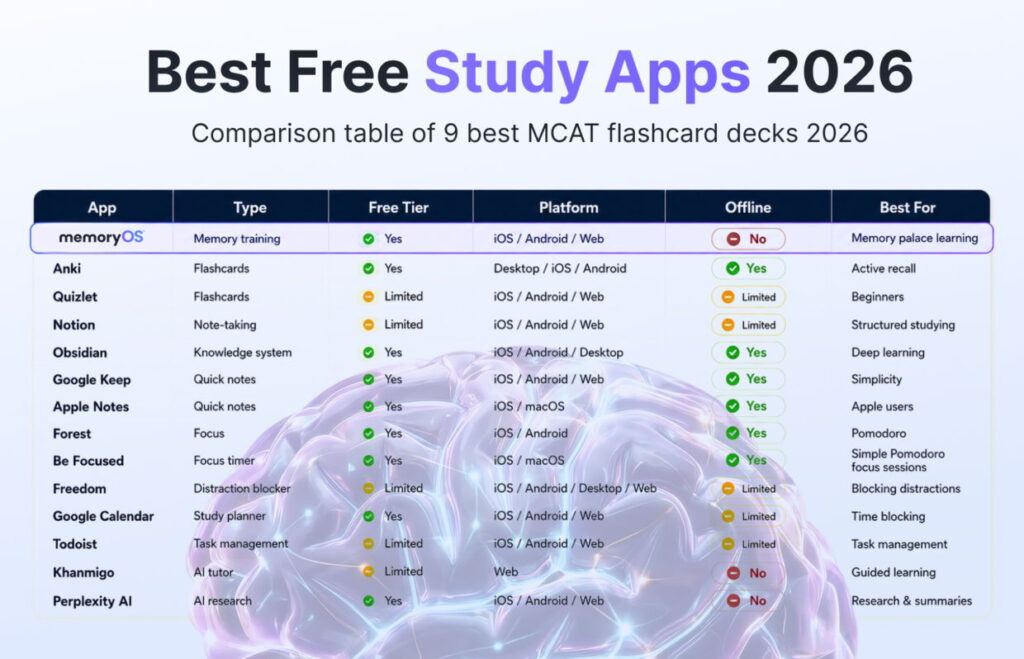
This table contains all information about the efficiency of the applications when used for solving different issues while studying. One can use this table to find out which is the best app to reach a specific goal fast. It will be helpful when comparing several apps for studying instead of downloading all the apps at once.
| App | Type | Free Tier | Platform | Offline | Best For |
| Anki | Flashcards | Yes | Desktop / iOS / Android | Yes | Active recall |
| Quizlet | Flashcards | Limited | iOS / Android / Web | Limited | Beginners |
| memoryOS | Memory training | No | iOS / Android / Web | No | Memory palace learning |
| Notion | Note-taking | Limited | iOS / Android / Web | Limited | Structured studying |
| Obsidian | Knowledge system | Yes | iOS / Android / Desktop | Yes | Deep learning |
| Google Keep | Quick notes | Yes | iOS / Android / Web | Yes | Simplicity |
| Apple Notes | Quick notes | Yes | iOS / macOS | Yes | Apple users |
| Forest | Focus | Yes | iOS / Android | Yes | Pomodoro |
| Be Focused | Focus timer | Yes | iOS / macOS | Yes | Simple Pomodoro focus sessions |
| Freedom | Distraction blocker | Limited | iOS / Android / Desktop / Web | Limited | Blocking distractions |
| Google Calendar | Study planner | Yes | iOS / Android / Web | Limited | Time blocking |
| Todoist | Task management | Limited | iOS / Android / Web | Limited | Task management |
| Khanmigo | AI tutor | No | Web | No | Guided learning |
| Perplexity AI | AI research | Yes | iOS / Android / Web | No | Research & summaries |
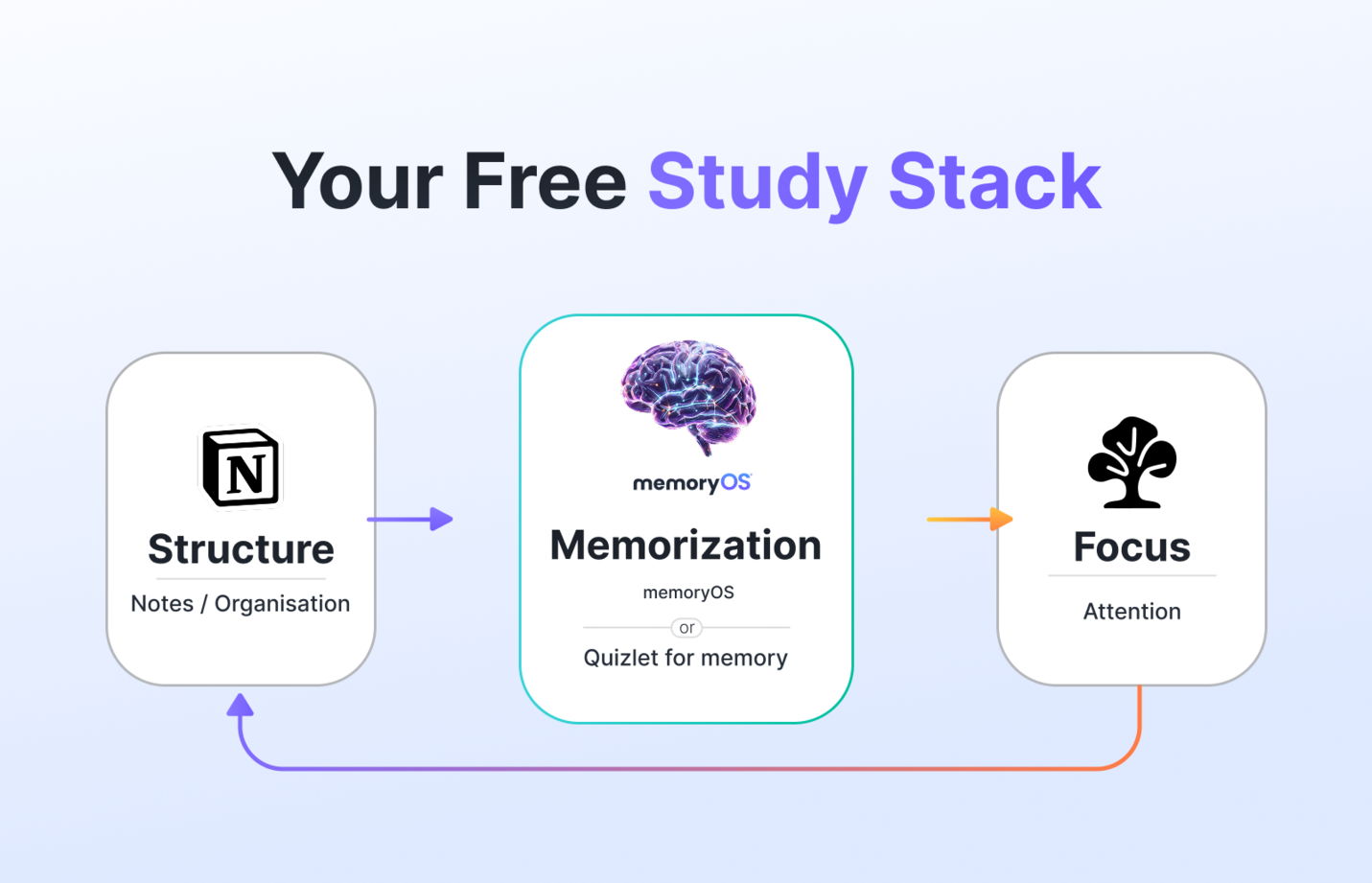
It is important to use a combination of different studying apps instead of each app individually. It has been observed that individuals who utilise a combination of one organising application (Notion or Todoist), one memorising application (Anki or Quizlet), and one concentration application (Forest) perform better compared to those using only one application. It becomes important to achieve a balance of structure + memorisation + attention.
FAQ
What is the best free study app for students?
It will depend on your intention. While Notion is useful for organisation, Anki and Quizlet are useful for memorisation, and Forest is useful for concentration. However, if you can select only one, Quizlet is the most balanced application among all other applications.
Are there any completely free study apps (no hidden fees)?
Yes, there are various applications that can be used freely. They include Anki (desktop version), Quizlet Free, Notion Free, Google Calendar, Forest Free, Khan Academy, and Khanmigo. They all offer the basic functions without requiring upgrading, which allows them to be considered free study app choices for students.
Which study app is best for memorisation?
To improve memorization, Anki can be used, as it employs spaced repetition. The memoryOS app will be useful to visual learners, as it incorporates spatial coding through the memory palace technique. Studies show that spatial encoding leads to 35% better memorization than repetition. Thus, memoryOS can be used as an alternative free memory app.
What study apps do college students use most?
Students mostly use a variety of apps: Quizlet for flashcards, Notion for note-taking, Google Calendar for planning and scheduling, and Forest to concentrate. Students increasingly use AI applications such as Perplexity AI and Khanmigo.
Is there a free study app that works offline?
Yes, there are several such apps, including Anki, which works entirely offline, Obsidian with all its contents stored locally, Forest, which does not require internet at all, and Google Keep, which allows you to take notes without being online. However, Quizlet and Notion have limited offline usage.
Build Your Free Study Stack for 2026
The problem with studying is rarely connected with the lack of tools but rather with having too many separate tools. The best way of dealing with studying problems is setting up a simple system consisting of one app (Forest), one note-taking tool (Notion), and one memory trainer (memoryOS or Quizlet).
If you want to move to the next level of learning (as opposed to organizing information), you can start memoryOS for free and see how spatial memory techniques impact the speed and accuracy of memorization. You can also find out about your baseline working memory by means of free memory games.